GitHub Copilot Best Practices for 2026: copilot-instructions.md, AGENTS.md & Agent Mode
Last updated: March 2026 · 18 min read
GitHub Copilot ships with three built-in configuration layers that most developers never fully use: project-wide instruction files (.github/copilot-instructions.md and AGENTS.md), session-level Copilot Chat directives, and suggestion-level inline comments. Understanding how these layers interact — and which one to reach for in each situation — is the difference between getting generic boilerplate and getting suggestions that fit your codebase from the first keystroke.
This guide covers all three layers with working examples, covers agent mode and coding agent workflows, and includes a diagnostic framework for knowing when to reject a suggestion rather than accept it blindly.
1. How GitHub Copilot Builds Context: Source Hierarchy
Copilot does not treat all context equally. It reads from multiple sources simultaneously and applies a priority weighting when sources conflict. Understanding this hierarchy prevents you from wasting effort on low-priority hints.
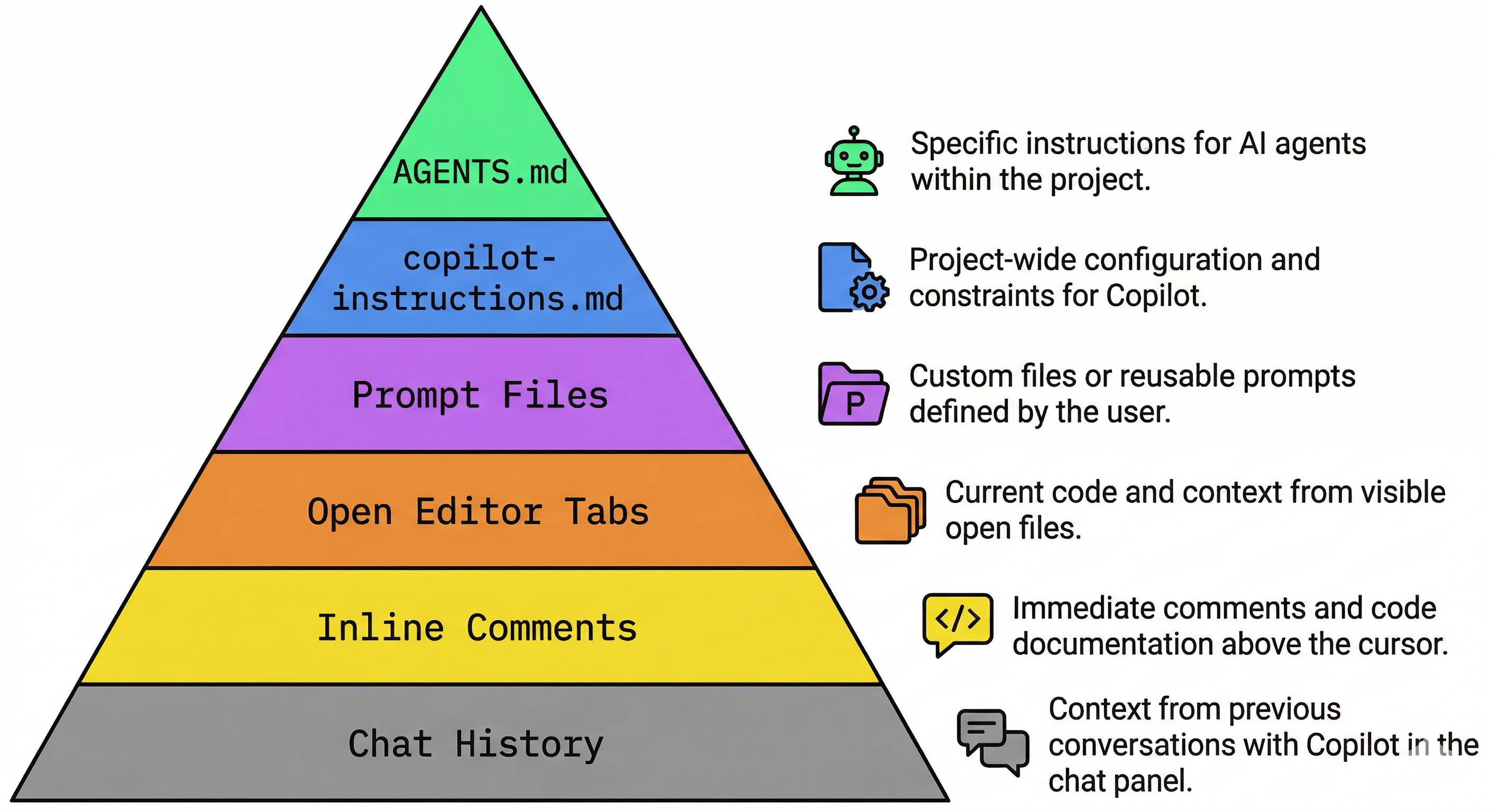
| Priority | Source | Scope | Notes |
|---|---|---|---|
| 1 — Highest | AGENTS.md |
Repository / directory | Read by Copilot CLI, coding agent, and @github in Copilot Chat during agentic tasks |
| 2 | .github/copilot-instructions.md |
Repository-wide | Applied to every chat request and inline suggestion in the repository |
| 3 | Prompt files (.github/prompts/*.prompt.md) |
Per-task | Reusable prompt templates invoked explicitly in chat |
| 4 | Open editor tabs | Session-wide | Copilot scans open files for patterns and imports |
| 5 | Inline comments | File / cursor-local | Highest specificity, lowest scope |
| 6 | Copilot Chat history | Session | Reset with /clear; does not persist between sessions |
Practical consequence: If your copilot-instructions.md says "prefer async/await over promise chains" but your open tab uses .then() throughout, the open tab will often win at the suggestion level. Keep your instruction files consistent with your existing code, or the model will average between them.
2. Native Configuration: copilot-instructions.md vs AGENTS.md vs Prompt Files
Three files, three purposes. Using the wrong one for a task creates inconsistency and wastes configuration effort.
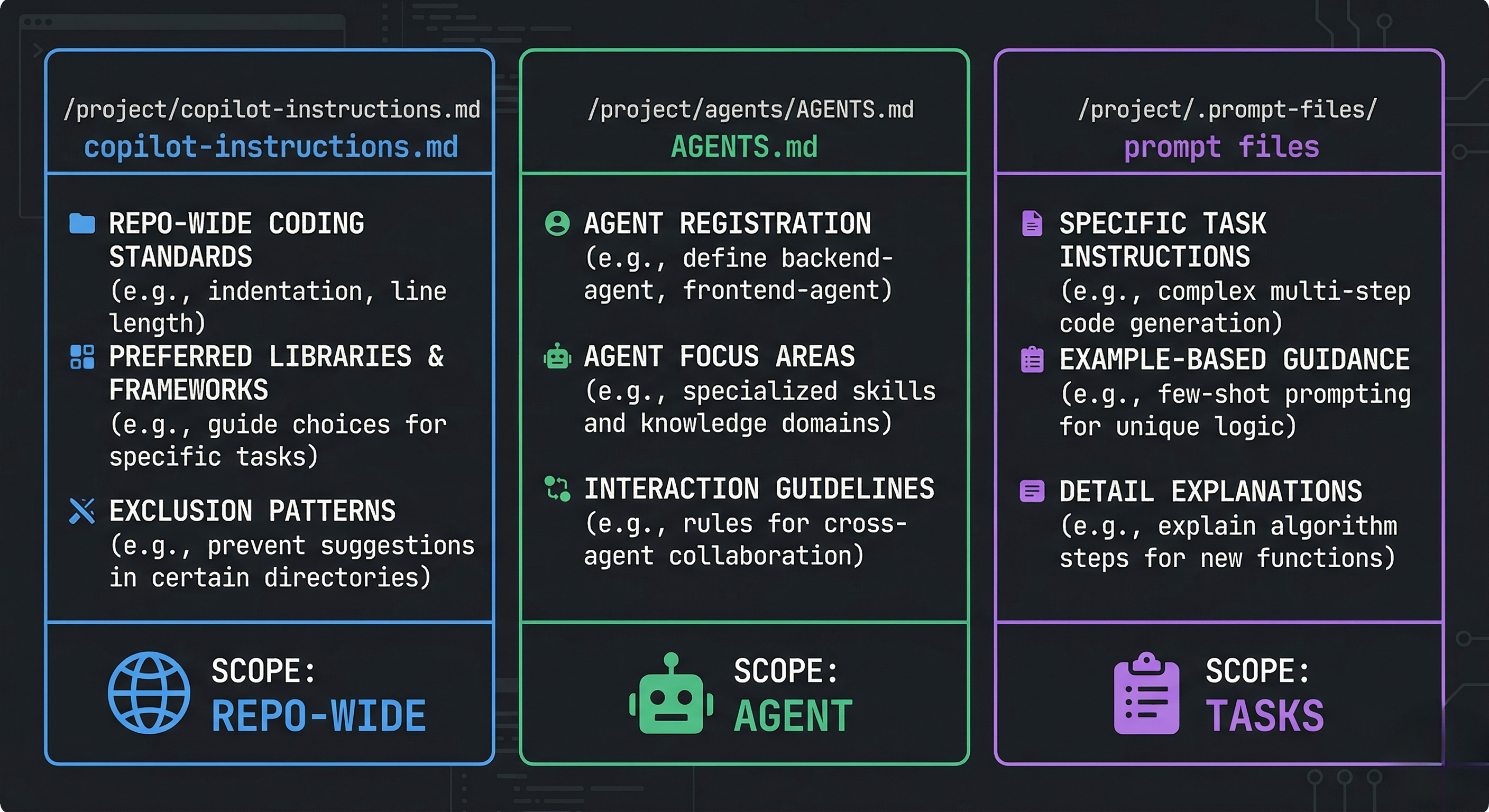
copilot-instructions.md |
AGENTS.md |
Prompt files | |
|---|---|---|---|
| Location | .github/copilot-instructions.md |
Repository root or any directory | .github/prompts/*.prompt.md |
| Who reads it | Copilot in VS Code / JetBrains / Visual Studio for all chat and inline suggestions | Copilot CLI, coding agent, @github in Copilot Chat |
Invoked manually in chat via #filename reference |
| Best for | Team-wide code style, architecture constraints, testing standards | Agentic task instructions: build commands, test commands, acceptance criteria format | Repeatable task templates: PR descriptions, code review checklists, migration scripts |
| Persists across sessions | Yes | Yes | Yes |
| Applies automatically | Yes | Yes (during agent runs) | No — must be referenced explicitly |
| Max recommended length | 400–600 words | 200–400 words per scope | Unlimited (task-specific) |
Rule of thumb:
copilot-instructions.mdis your house style guide.AGENTS.mdis your task brief for the AI contractor. Prompt files are your reusable checklists.
3. Writing Effective copilot-instructions.md
What to include
A good copilot-instructions.md covers four areas: language/framework constraints, coding conventions, testing requirements, and explicit prohibitions. It does not need to explain why — Copilot does not reason about rationale, it pattern-matches against the instructions.
Structure that works
# Copilot Instructions

## Language & Runtime
- TypeScript 5.x with strict mode enabled. No implicit `any`.
- Target Node.js 20 LTS. Do not use APIs unavailable in Node 20.

## Code Style
- Functional components with named exports. No default exports except for pages.
- Pure functions preferred. Avoid side effects in utility modules.
- Maximum function length: 40 lines. Extract if longer.

## Error Handling
- All async functions must use try/catch. Never swallow errors silently.
- Return typed Result objects `{ data, error }` from service layer functions — do not throw across layer boundaries.

## Testing
- Jest + React Testing Library for unit/integration tests.
- Playwright for end-to-end tests. Cover: happy path, error state, empty state.
- Never mock the module under test.

## Security
- Never suggest hardcoded secrets, API keys, or tokens. Always use `process.env`.
- Sanitize all user-supplied strings before using in database queries. Use parameterized queries only.

## Prohibited Patterns
- No `var`. No `eval()`. No `dangerouslySetInnerHTML` without explicit sanitization.
- Do not use deprecated React lifecycle methods.
- Do not install new npm packages without confirming with the team first.
What kills effectiveness
- Instructions longer than 600 words: Copilot does not read the full file during inline suggestion generation. Instructions beyond the effective context window are silently ignored.
- Abstract directives: "Write clean code" and "follow best practices" carry zero signal. Copilot cannot operationalize them. Write observable, checkable rules.
- Contradictions with existing codebase: If your instructions say "no callbacks" but 40% of your files use callbacks, Copilot will interpolate. Clean up the codebase first, or acknowledge the exception explicitly.
- Not committing the file:
copilot-instructions.mdmust be committed to the repository to work for the whole team. A file that exists only locally only helps the developer who created it.
4. Writing Effective AGENTS.md
AGENTS.md is specifically designed for agentic workflows — when you delegate a task to the Copilot coding agent or run Copilot CLI. It tells the agent how to operate in your repository, not just what style to use.
What to include
# AGENTS.md

## Build & Run
- Install dependencies: `npm install`
- Start development server: `npm run dev`
- Run all tests: `npm test`
- Run a single test file: `npm test -- --testPathPattern=<filename>`
- Lint: `npm run lint`
- Type check: `npm run typecheck`

## Before Opening a PR
- All tests must pass: `npm test`
- No TypeScript errors: `npm run typecheck`
- No ESLint errors: `npm run lint`
- Update CHANGELOG.md under [Unreleased]

## Code Locations
- API routes: `src/app/api/`
- Database models: `src/lib/db/models/`
- Shared utilities: `src/lib/utils/`
- Component library: `src/components/ui/`

## Testing Instructions
- Tests live next to source files: `Button.tsx` → `Button.test.tsx`
- Integration tests live in `__tests__/integration/`
- Use `userEvent` from `@testing-library/user-event`, not `fireEvent`

## Do Not
- Do not modify `package-lock.json` manually
- Do not change database migration files once committed
- Do not add `console.log` statements to production code
Key difference from copilot-instructions.md
copilot-instructions.md shapes how code is written. AGENTS.md shapes how the agent operates — what commands to run, where things live, what definition-of-done means. Both can coexist and serve complementary roles.
5. Best Practices for Inline Suggestions
Use comments to set scope, not style
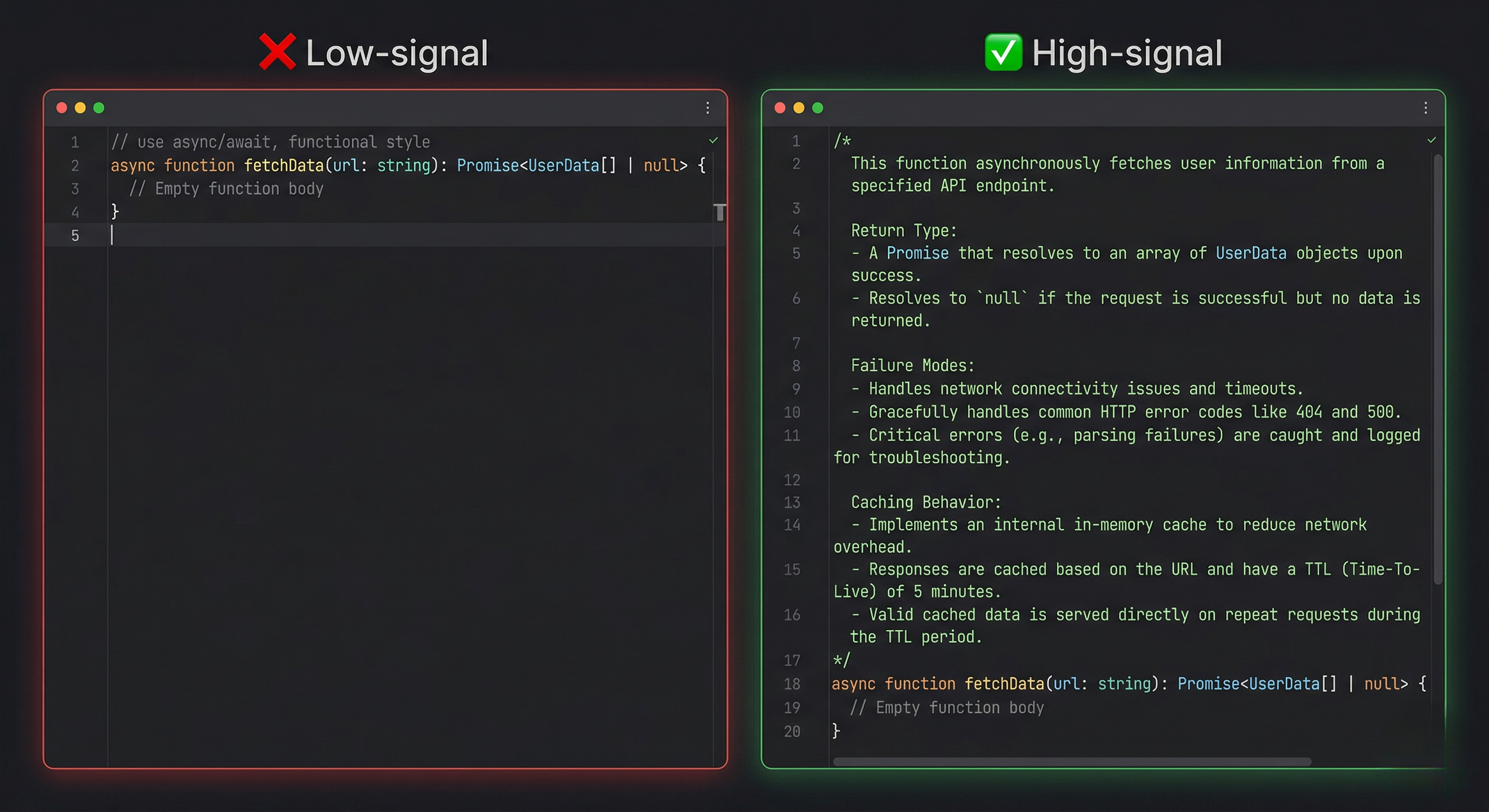
Inline comments work best when they define the task scope and constraints for the next function, not when they repeat style preferences (those belong in copilot-instructions.md).
Low-signal comment (style-focused):
// use async/await, functional style, TypeScript
async function fetchUser() {
High-signal comment (scope and constraint-focused):
// Fetch user by ID from /api/users/:id
// Returns null if 404, throws on network error
// Cache result in-memory for 60 seconds using userCache map
async function fetchUser(id: string): Promise<User | null> {
The second comment defines the function's contract, not its aesthetics. Copilot produces dramatically better suggestions when it knows the return type, the failure modes, and the side effects upfront.
Place the comment immediately before the code
Copilot's inline suggestion mechanism reads the closest preceding comment with the highest weight. A comment 20 lines above the cursor has significantly less influence than one on the line directly above it.
Use /clear between unrelated tasks in Copilot Chat
Chat history is context. If you spent 30 minutes debugging a regex parser and then switch to writing a REST endpoint, the session history is actively pulling suggestions toward regex patterns. Run /clear before switching to a new area of work.
Specify what you do NOT want
// Parse ISO 8601 date string to Date object
// Do not use moment.js or any external library — native Date API only
function parseISODate(input: string): Date {
Negative constraints are often more valuable than positive ones — they prevent Copilot from defaulting to the most statistically common solution, which may not be the right one for your codebase.
6. Best Practices for Copilot Chat
Use @workspace for cross-file questions
@workspace tells Copilot to search the entire indexed codebase before answering. Without it, Copilot reasons from the currently open file only.
@workspace Where is the authentication middleware applied and does it cover the /admin routes?
@workspace Find all places where we call the legacy UserService and list them with file paths
Use #file to reference specific files
When your question involves a specific file, reference it explicitly rather than hoping it's in the open tabs:
Explain the data flow in #file:src/lib/auth/session.ts and flag any potential token leakage
Use /model to switch models during a session
Not every task needs the same model. Switch deliberately:
| Task type | Recommended model |
|---|---|
| Explaining a complex codebase, architecture review | Claude Opus 4.5 or GPT-4o |
| Writing new functions, boilerplate generation | Claude Sonnet 4.5 (default Auto) |
| Fast autocomplete, simple refactoring | Auto (typically faster models) |
| Code review, security audit | Claude Opus 4.5 |
Run /model in Copilot Chat to see available options and switch without leaving the editor.
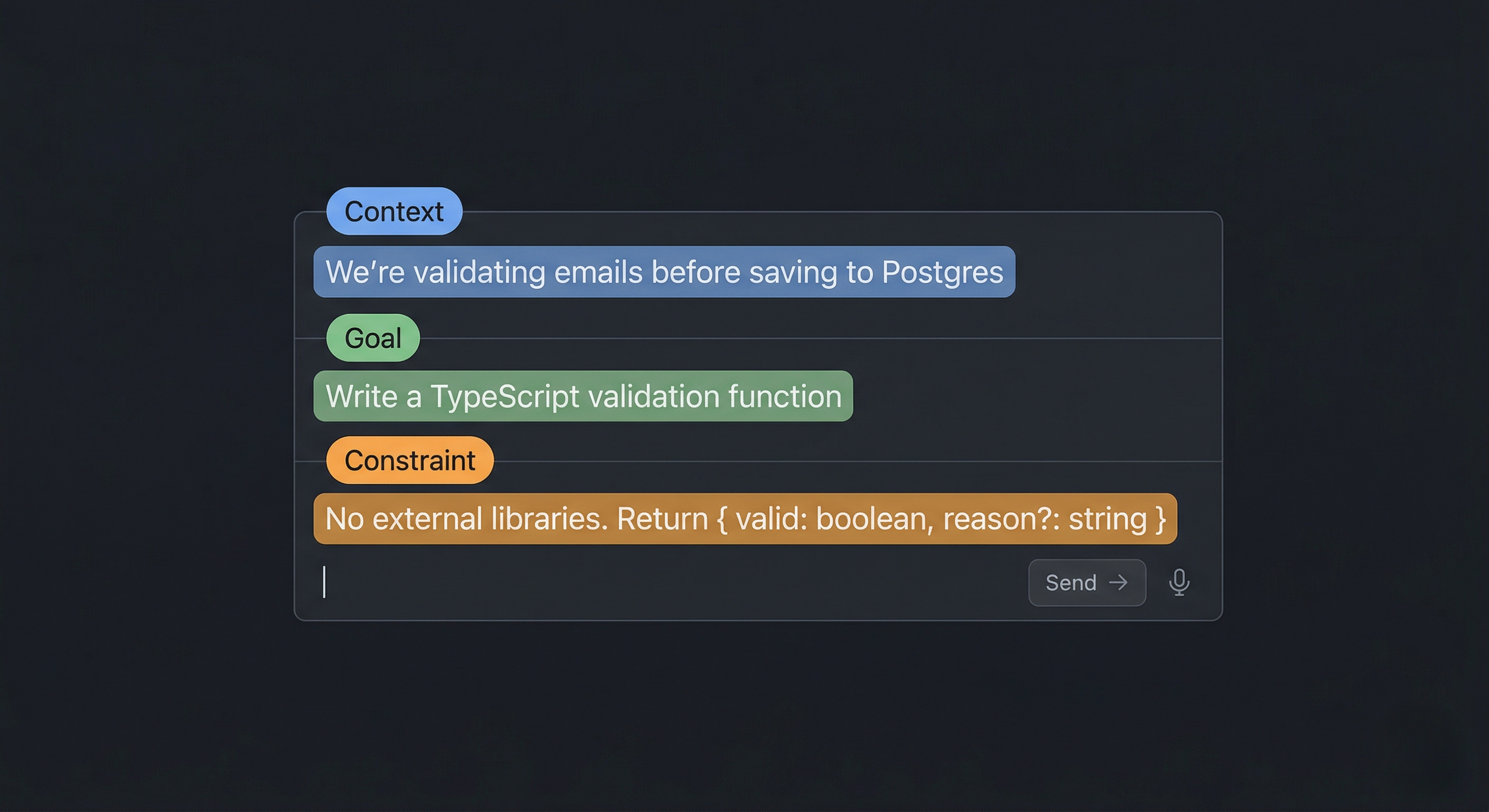
Structure your requests with context + goal + constraint
Unstructured:
write a function to validate emails
Structured:
Context: We're validating email addresses before saving to Postgres.
Goal: Write a TypeScript function that validates email format.
Constraint: No external libraries. Return { valid: boolean, reason?: string }.
Return type must handle internationalized domain names.
The structured version produces a function that fits your stack and your error-handling pattern, not just a generic email regex.
7. Best Practices for Copilot Coding Agent & Agent Mode
What the coding agent is
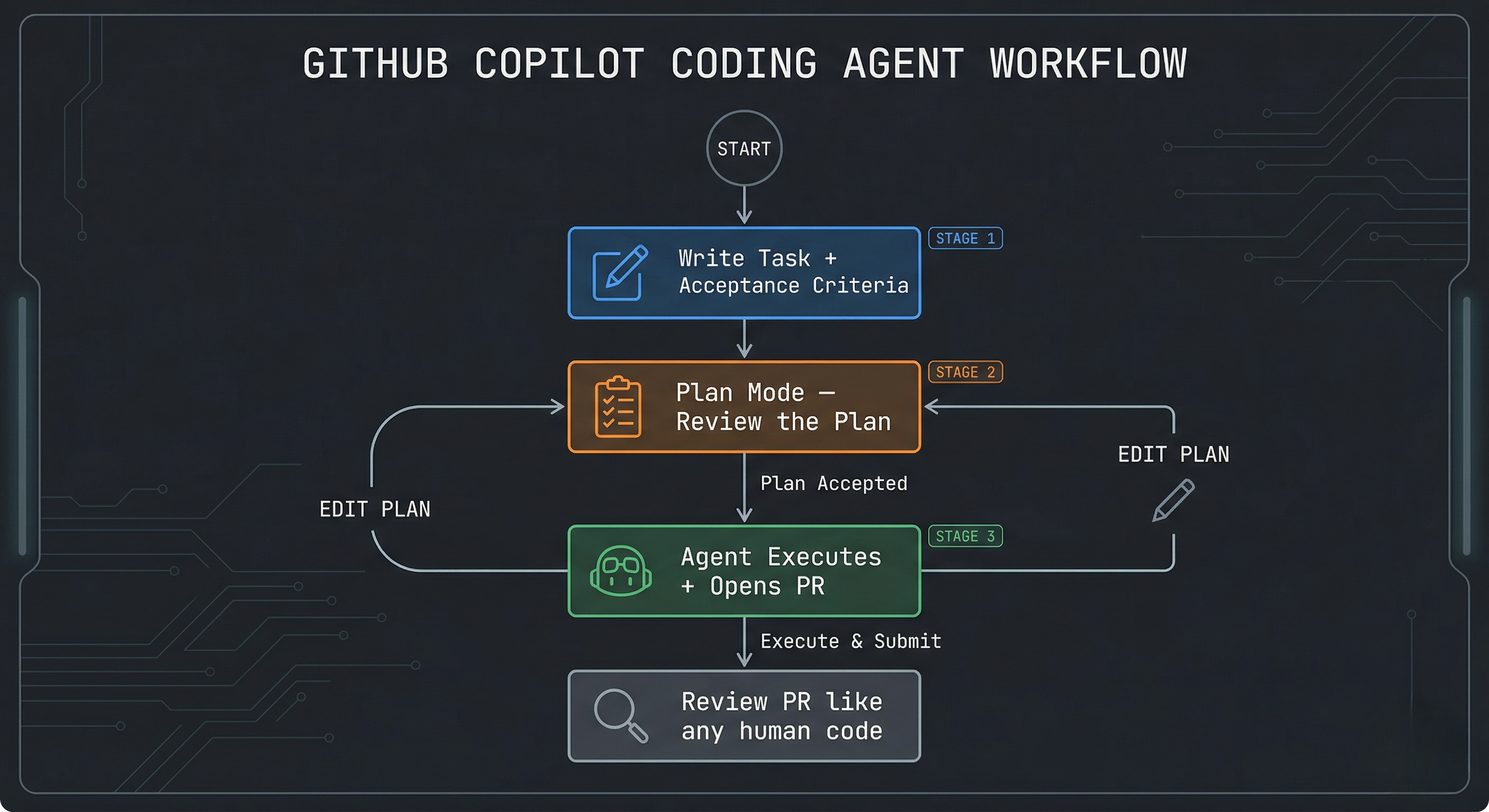
The Copilot coding agent (available in GitHub.com and VS Code) can autonomously complete multi-step tasks: reading files, writing code, running tests, and opening pull requests. It reads AGENTS.md to understand how to operate in your repository.
Plan mode: always use it before agent mode on large tasks
Plan mode generates a structured implementation plan for you to review before any code is written. This is not optional overhead — it is the most important quality gate in the agentic workflow.
When to use plan mode:
- Tasks that touch more than 3 files
- Refactoring tasks where side effects are unclear
- Any task that modifies a database schema, API contract, or public interface
In VS Code, select "Plan" in the Copilot Chat panel before sending your request. Review the plan and edit it before approving execution.
Write agent tasks with explicit acceptance criteria
Vague agent task:
Add dark mode to the app
Agent-ready task:
Add dark mode support to the app.

Acceptance criteria:
1. Add a ThemeProvider wrapping _app.tsx that reads from localStorage key "theme" (values: "light" | "dark")
2. All existing Tailwind classes should have dark: variants where color contrast is affected
3. Add a toggle button in components/Header.tsx
4. Write a Playwright test that: sets localStorage to "dark", reloads, asserts <html> has class "dark"
5. Do not modify any database schema or API routes
The acceptance criteria become the agent's definition of done. Without them, the agent optimizes for output volume, not correctness.
Scope agent tasks to single responsibilities
The coding agent performs best when a task has one clear outcome. A task like "refactor the auth module and add dark mode and fix the pagination bug" will produce lower-quality results than three separate, focused tasks. Treat each agent session as a single PR scope.
Review agent PRs like any human PR
The coding agent opens pull requests. Apply the same review standards you'd apply to a junior developer's PR: check for missed edge cases, verify tests actually test the right behaviour, and confirm no unintended files were modified.
8. Model Selection: When to Switch Away from Auto
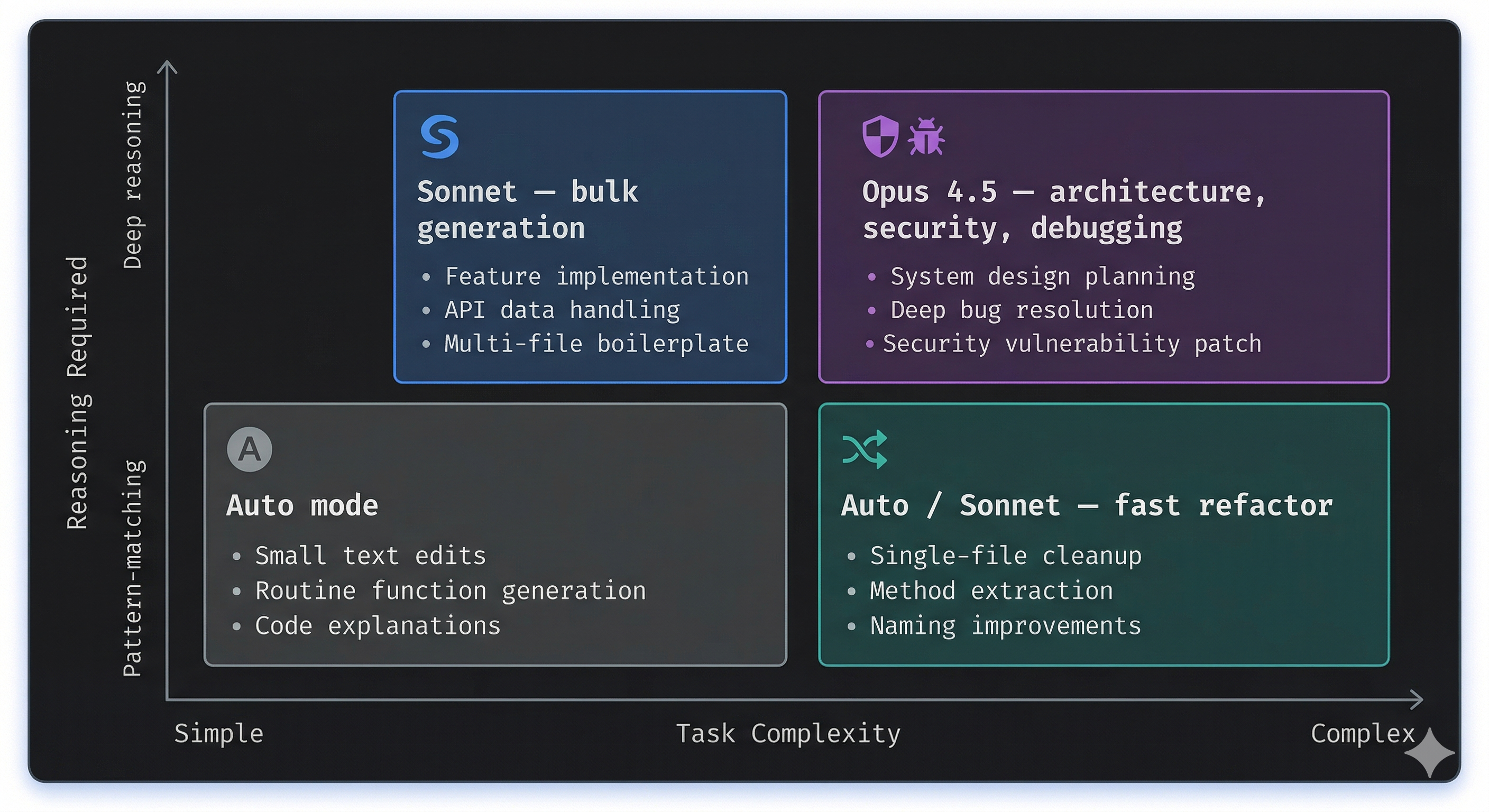
Copilot's Auto mode selects the model based on task type. In most cases it makes the right call. Switch manually when you have a specific reason to:
| Situation | Action | Why |
|---|---|---|
| Reviewing a large codebase for security issues | Switch to Opus 4.5 | Better multi-file reasoning; catches subtle vulnerabilities |
| Writing CRUD boilerplate for a well-defined schema | Stay on Auto | Fast generation; task is pattern-matching, not reasoning |
| Explaining why a complex algorithm produces wrong output | Switch to Opus 4.5 | Requires multi-step logical reasoning, not generation |
| Generating 20 unit test cases for a service | Auto or Sonnet | High-volume generation; Sonnet is faster and sufficient |
| Architecting a new feature from scratch | Opus 4.5 in plan mode | Architecture decisions benefit from deeper context analysis |
| Filling in JSDoc comments across a file | Auto | Templated task; model quality difference is negligible |
To switch: type /model in Copilot Chat, or use the model picker in the chat panel header.
9. When NOT to Accept a Suggestion: Diagnostic Framework
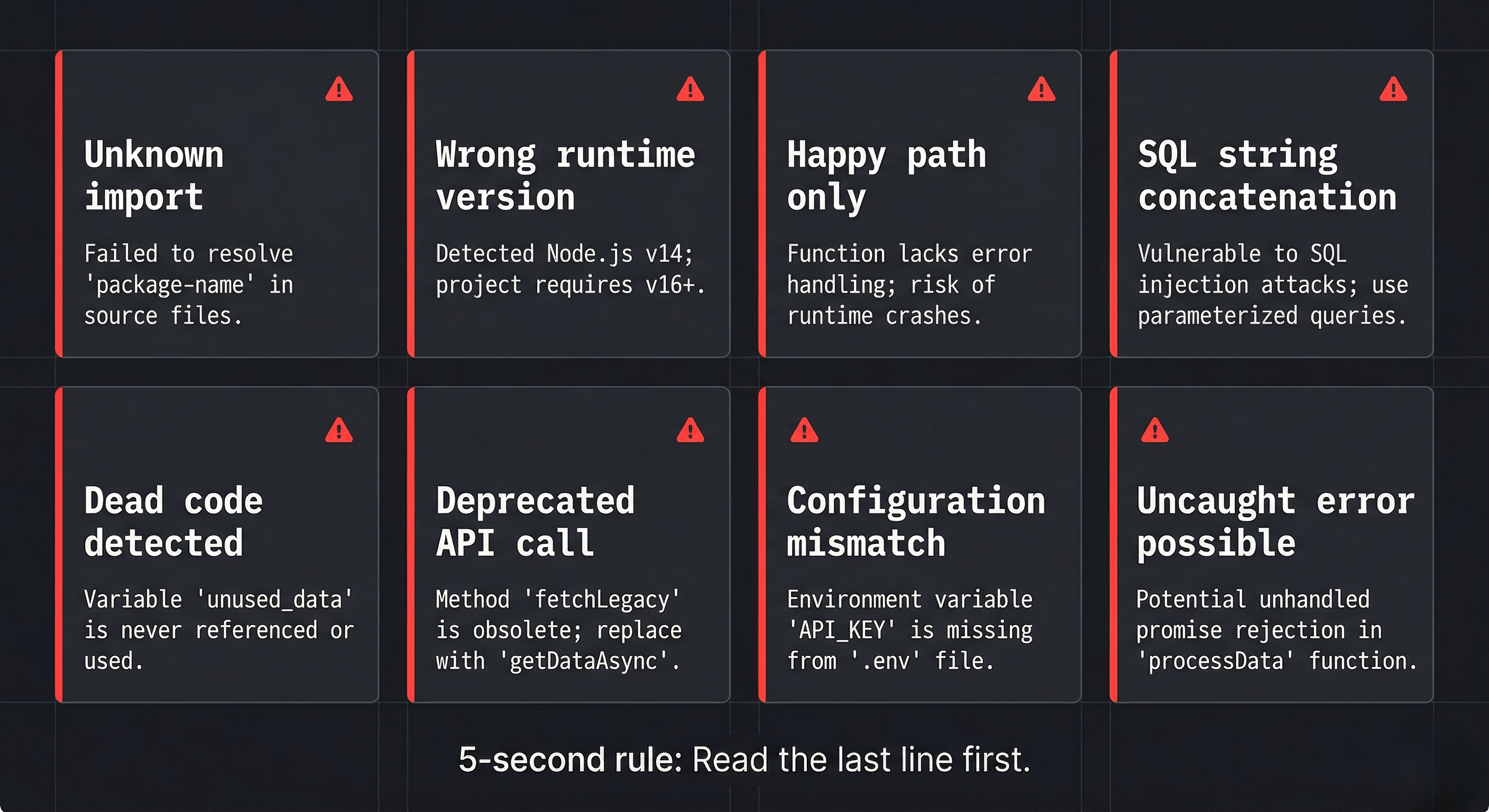
This is the most underused skill in AI-assisted development. Accepting bad suggestions at speed is worse than writing code manually, because it embeds subtle bugs that are hard to catch in code review.
Red flags that indicate a suggestion should be rejected
| Signal | What it means | What to do |
|---|---|---|
Suggestion imports a library not in your package.json |
Copilot defaulted to a common ecosystem solution, not your stack | Reject; add the constraint to copilot-instructions.md |
| Suggestion uses a method from a newer runtime version than your target | Copilot is not tracking your version constraints | Reject; specify version constraints in copilot-instructions.md |
| Suggestion ignores the error handling pattern visible in surrounding code | Copilot over-weighted training data over local context | Reject; add an inline comment specifying the exact pattern |
| Suggestion solves a different problem than the one in your comment | Your comment was ambiguous | Reject; rewrite the comment with explicit input/output contract |
| Test suggestion only covers the happy path | Copilot defaults to minimum viable test coverage | Partial accept; manually add error state and edge case tests |
Suggestion introduces console.log or a TODO comment |
Template pattern from training data | Edit before accepting |
| Suggestion is 3–5x longer than it needs to be | Task scope is unclear to the model | Reject; narrow the scope in your comment |
| SQL query uses string concatenation with user input | Critical security issue — SQL injection vector | Reject immediately; use parameterized queries |
The 5-second review rule
Before pressing Tab on any multi-line suggestion: read the last line first. If the last line is wrong — wrong return type, missing error handling, wrong variable name — the suggestion is a draft, not an answer. Edit or reject.
10. Common Team Mistakes When Adopting Copilot
Most teams that struggle with Copilot suggestion quality are making one of these five mistakes:
1. Writing instructions that are too long
copilot-instructions.md files over 1,000 words are routinely ignored past the effective context window. Focus on the 10 rules that matter most. If you have 40 rules, you have a style guide, not an instruction file — link to the style guide and extract only the top-10 most critical items into the instructions file.
2. Not updating instructions when the stack changes If you migrate from Webpack to Vite, or from REST to tRPC, your instruction file needs to update on the same day. Stale instructions actively mislead Copilot and produce suggestions that look plausible but don't fit the new stack.
3. Treating Copilot output as production-ready without review Copilot is a fast first draft, not an autonomous engineer. Teams that skip code review for Copilot-generated code accumulate subtle technical debt faster than teams that write code manually and review it carefully.
4. Using the same context for unrelated tasks
Running a deep debugging session followed by a feature implementation in the same chat window without /clear causes the model to contaminate the second task with context from the first. Reset deliberately when switching areas of work.
5. Not committing copilot-instructions.md and AGENTS.md to the repository
These files need to be committed and code-reviewed like any other configuration. If they live only on one developer's machine, the team gets inconsistent suggestions depending on who opened the PR.
11. Full Working Example: copilot-instructions.md for a TypeScript Monorepo
A complete, ready-to-use copilot-instructions.md. Adapt it to your stack rather than using it verbatim.
# Copilot Instructions

## Stack
- TypeScript 5.4, strict mode. Node.js 20 LTS. React 18.
- Monorepo managed with Turborepo. Apps in `apps/`, shared packages in `packages/`.
- Database: PostgreSQL via Drizzle ORM. No raw SQL strings with user input.
- API layer: tRPC v11 routers in `packages/api/src/routers/`.

## Code Conventions
- Named exports everywhere. No default exports except Next.js pages.
- Functional components only. No class components.
- Prefer `const` over `let`. Never use `var`.
- Maximum function length: 40 lines. If longer, extract a helper.
- Boolean variables: prefix with `is`, `has`, or `should`.

## Error Handling
- Service layer functions return `{ data: T; error: null } | { data: null; error: AppError }`.
- Never throw across layer boundaries. Catch at the service layer, propagate as typed error.
- All `async` functions must include try/catch. No silent failures.

## Testing
- Unit tests: Vitest + React Testing Library, co-located with source (`*.test.ts`).
- E2E tests: Playwright in `apps/web/e2e/`.
- Required coverage: happy path + at least one error state + at least one edge case.
- Use `userEvent` from `@testing-library/user-event`. Do not use `fireEvent`.
- Do not mock the module under test.

## Security
- Never hardcode secrets, API keys, or tokens. Use `process.env` with Zod validation at startup.
- All user input must be validated with Zod before database operations.
- Use Drizzle parameterized queries only — never string concatenation in SQL.

## Prohibited
- No `console.log` in production code. Use the `logger` utility in `packages/logger`.
- No `dangerouslySetInnerHTML` without explicit sanitization via `DOMPurify`.
- Do not install new packages without team discussion.
- Do not modify files in `packages/db/migrations/` — use `npm run db:generate` instead.
Companion AGENTS.md:
# AGENTS.md

## Setup
- Install: `npm install` from root
- Build all packages: `npm run build`
- Start web app: `npm run dev --filter=web`

## Testing
- Run all tests: `npm test`
- Run tests for one package: `npm test --filter=<package-name>`
- Type check: `npm run typecheck`
- Lint: `npm run lint`

## Before Submitting a PR
- All tests pass: `npm test`
- No type errors: `npm run typecheck`
- No lint errors: `npm run lint`
- New features require tests. New API routes require at least one Playwright test.
- Update `CHANGELOG.md` under [Unreleased]

## Code Locations
- Web app: `apps/web/src/`
- API routers: `packages/api/src/routers/`
- DB schema: `packages/db/src/schema/`
- Shared types: `packages/types/src/`
- Component library: `packages/ui/src/`

## Do Not
- Do not edit `package-lock.json` manually
- Do not modify migration files after they are committed
- Do not add `console.log` to any file — use the logger
12. FAQ
What is .github/copilot-instructions.md and how is it different from .cursorrules?
copilot-instructions.md is GitHub Copilot's native project-wide configuration file. It is read automatically by Copilot in VS Code, JetBrains IDEs, and Visual Studio for every inline suggestion and Copilot Chat request within the repository. .cursorrules is a separate, Cursor-specific format. The two serve the same conceptual purpose but are not interchangeable — Copilot does not read .cursorrules.
What is AGENTS.md and when should I create it?
AGENTS.md is an instruction file specifically for agentic workflows — Copilot CLI, the Copilot coding agent, and @github in Copilot Chat when running multi-step tasks. Create it as soon as your team starts using Copilot for automated tasks beyond inline suggestions. Its primary value is telling the agent which commands to run, where code lives, and what your definition of done looks like for a task.
How do I verify that Copilot is actually reading my copilot-instructions.md?
In VS Code, open Copilot Chat and ask: @github Summarize the coding conventions in this project's copilot-instructions.md. If Copilot returns an accurate summary, it is reading the file. If it returns a generic answer, verify that the file is committed, that the path is exactly .github/copilot-instructions.md, and that you are on a plan that supports repository instructions (Business or Enterprise for organization-wide propagation).
Does Copilot work equally well with Python, Go, and Java as with TypeScript?
Yes. Suggestion quality for Python, Go, Java, Rust, and C# is comparable to TypeScript. The examples in this guide use TypeScript, but all configuration principles — instruction files, inline comment patterns, agent task scoping — apply identically to any language. Replace the language-specific rules in copilot-instructions.md with the equivalent for your stack.
How do I switch models in Copilot Chat?
Type /model in the Copilot Chat input to open the model picker. Available models depend on your Copilot plan. On Copilot Business and Enterprise, you typically have access to Claude Sonnet, Claude Opus, GPT-4o, and o3. The Auto mode selects the model based on task type; switch manually when you have a specific reason to (see Section 8).
For the full official documentation, visit docs.github.com/en/copilot. For community-contributed examples of copilot-instructions.md and AGENTS.md from real projects, see github/awesome-copilot.